Which MacBook handles your programming work without paying for unused power?
MacBook Air M5 or M5 Pro: what changes when programming?
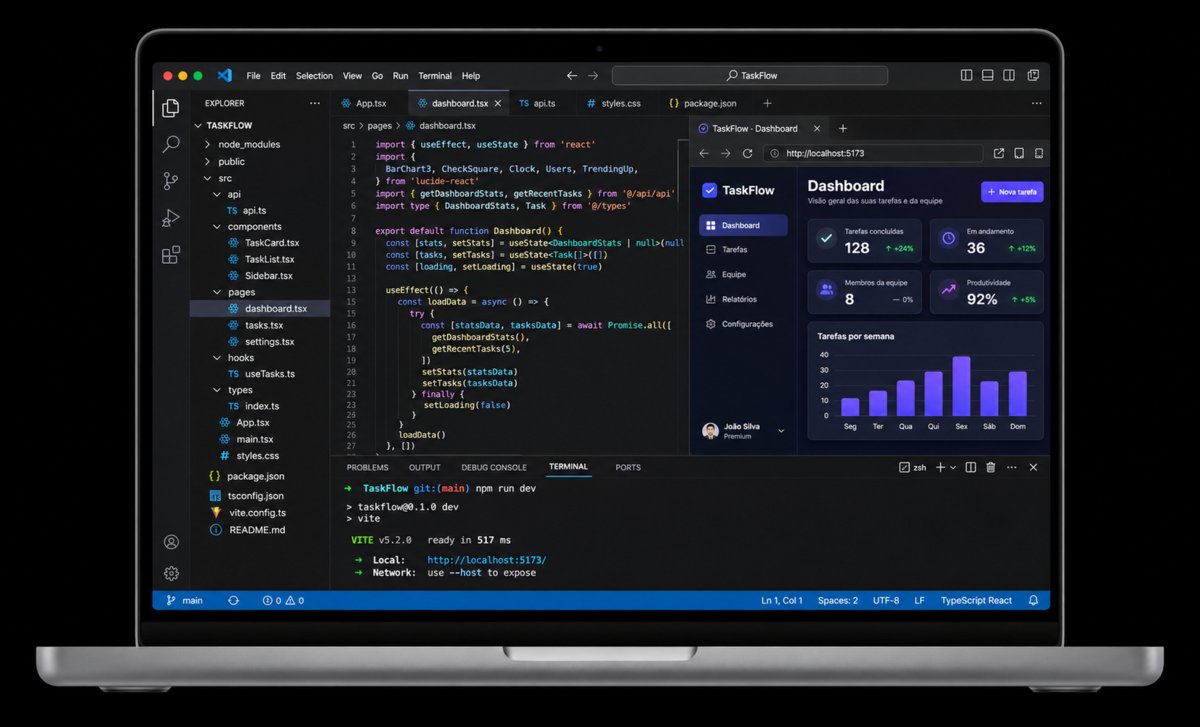
Which MacBook is best for programming in 2026? The MacBook Air M5 and MacBook Pro M5 Pro support development environments with different resources.The Air favors low weight and fanless operation. The Pro combines active cooling, additional connections and different components. Specifications describe these resources, while the project determines how much they matter.
Consider a web project with an editor, local server and browser. Then consider an iOS application with Xcode compiling while a simulator stays open.Add Docker services and automated tests in another workflow. These development environments have different needs. The constraint may be the number of active processes, processing throughput or the space occupied by development files.
For programming, the decisive difference is sustaining the work happening around the editor. Ask which tools must remain open and which operation delays the next step.The Pro becomes valuable when additional memory, connections or processing resources remove a specific project constraint. Use that constraint to judge configurations and decide how much capability your work requires.
How much memory and SSD storage do web, iOS and Docker need?
The entry configurations examined here give the Air 16 GB of unified memory and a 512 GB SSD. The Pro has 24 GB of unified memory and a 1 TB SSD.In a web project with an editor, development server, local database and browser tabs, applications share RAM. The SSD stores dependencies, caches and build artifacts. Repository size and daily work affect consumption.
Docker Desktop allows memory, CPU and disk limits for its virtual machine. Running an API, queue and database in containers alongside an editor and browser can make memory capacity important before processor capability.The relevant demand comes from the services actually running together. A small local stack can have different requirements from a production-like environment with several databases and workers.
For iOS development, Xcode can compile and run applications in simulators. Keeping a simulator, previews and other tools available increases the importance of installed memory.Specified bandwidth is 153 GB/s for the Air and 307 GB/s for the Pro. These figures describe the memory interface. They cannot establish build times or simulator speed for your project.
Large projects: how do processing and cooling matter?
In its entry M5 Air review, Notebookcheck observed reduced power consumption after prolonged CPU load, a relevant characteristic of fanless cooling. The review tested the base Air configuration.It did not compile your repository or compare its build time against the Pro selected here. The measurement explains thermal behavior within its test conditions.
The Ars Technica review, using a different Air size, distinguishes short tasks from extended multicore operations. Its conditions were not paired with this M5 Pro configuration.Active cooling deserves attention when the processor works intensively for extended periods. The available evidence cannot assign a fixed compilation speed improvement to that cooling difference.
In a monorepo, distinguish browsing files from rebuilding every dependency. Tests for one module place different demands on the machine from a full integration suite.Codebase size alone is a weak indicator. A recurring operation that occupies the CPU for a long time or competes with other processes can justify examining the Pro's additional resources.
You do not need to memorize core counts or protocols to compare these options. Simple questions about builds, multitasking and travel connect your routine with suitable configurations, helping you avoid resource limits and spending without a practical benefit. Start the quiz
What do the differences in ports and portability cost?
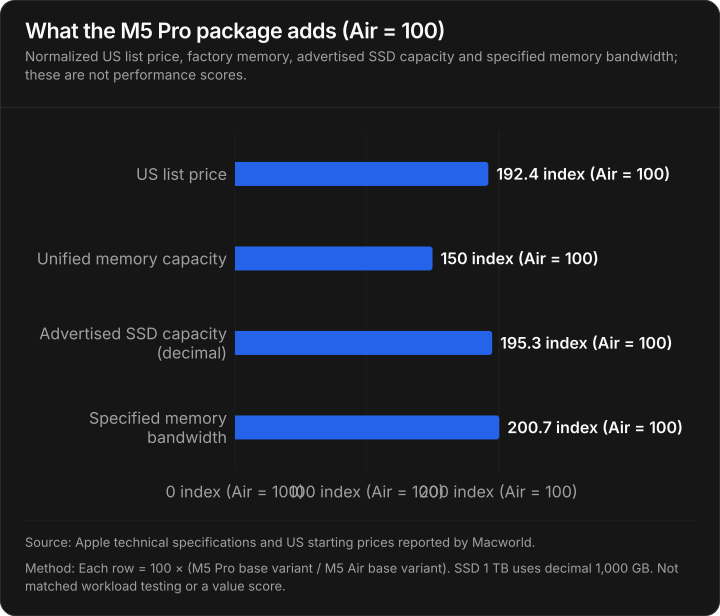
The US prices listed by Macworld, consulted on November 17, 2026, show US$1,299 for the entry Air and US$2,499 for the entry M5 Pro.The difference is US$1,200 across configurations with different memory and SSD capacities. That premium buys a collection of features. Its effect on compilation time depends on the actual development workload.
The Air weighs 1.23 kg and has two Thunderbolt 4 ports. The Pro weighs 1.60 kg and provides three Thunderbolt 5 ports, HDMI and an SDXC reader.When your workstation requires a monitor, external storage and accessories simultaneously, integrated connectivity can reduce adapter requirements. An existing dock may already cover those needs, while the additional laptop weight still travels with you.
The chart normalizes price, memory, SSD capacity and memory bandwidth against the Air configuration. These measurements serve different practical purposes, so their ratios describe the package without creating a performance score.For work split between a desk and travel, weight and ports also affect daily use. Consider the peripherals your actual workstation requires when evaluating the connections.
Air with 24 or 32 GB versus the 24 GB M5 Pro
Before moving from the Air to the Pro, consider whether adding memory would address the limitation in your development environment. The 13-inch MacBook Air M5 with 24 GB and a 512 GB SSD is listed at US$1,493 in the Amazon US price references consulted. At that price, it matches the base MacBook Pro M5 Pro's memory capacity while costing US$746 less.
If your editor, simulator and local services together need more room, the 32 GB MacBook Air M5 offers another option. Its reported price of US$1,690 is US$549 below the 24 GB MacBook Pro M5 Pro, with 8 GB more memory. Both Air configurations include a 512 GB SSD, however, so the lower price also comes with half the Pro's advertised storage capacity.
The 14-inch MacBook Pro M5 Pro with 24 GB and a 1 TB SSD is reported at US$2,239. Its additional cost becomes easier to justify when long builds, local project files or connected peripherals expose a limit that more memory alone would leave unresolved. For a workload that fits comfortably on the Air, the higher-memory configurations deserve consideration before spending more on the Pro.
Which MacBook suits web, iOS, Docker and large projects?
Web development. For a project with a front end, lightweight back end, terminal and browser, the M5 Air can be sufficient when its memory accommodates the environment. iOS applications. When Xcode, a simulator, previews and tests must remain available together, memory and storage for tools and project files become more important. Programming language alone cannot determine the required chip.
Docker. Assess simultaneous services, images, volumes and resource limits. Large projects. Distinguish reading and editing code from full builds and parallel tests. Even the M6 generation listed by Apple needs to be evaluated as a complete configuration. A newer chip still needs adequate memory, storage and connectivity for the environment you intend to run.
Three criteria remain practical: enough memory for environments that must coexist, processing resources suited to the operation that delays progress, and connections compatible with your workstation.The Air is a coherent purchase when it meets those needs at a lower weight and cost. The Pro makes sense when an additional resource removes an identifiable constraint in your work.
Find the right Mac for you
1 of 6 Questions
When you're working, what usually happens?
Multitasking habits
As an Amazon Associate I earn from qualifying purchases.