How Much Memory Do Your Apps Need When They Run Together?
What Needs to Stay Open While You Work?
How much RAM do you need in your next MacBook? Think about the busiest part of your last week. When someone asked for a change during a meeting, what had to stay open while you edited the file?A photo project, a call, and a presentation may each run well on their own. If sharing the revised version means leaving the call or closing the project, factor that interruption into your decision.
RAM holds the data you are working with. On Macs with Apple silicon, the processor and graphics hardware share it. A closed photo folder takes up space on the SSD. Open the photos, apply your edits, and switch back to the call to see how demanding the session is.If this will be your first Mac, list the apps you need to keep open and look for a macOS test with a similar project. Windows memory usage alone cannot tell you how that session will run on a Mac.
Start with a session you know you will repeat. The right amount of memory depends on the apps and projects you need to keep open at the same time.Notice which step slows down and what you could close without interrupting your work. That helps you judge whether extra capacity would pay off every week. Use the same test when comparing the memory options for the MacBook Air.
How Do You Read Memory Pressure on Your Current Mac?
In Activity Monitor, open the Memory tab and note Physical Memory, the amount installed. Recreate the session with the apps and file you identified. Watch the Memory Pressure graph during the step that usually slows down.Green indicates that your Mac is managing the workload efficiently. If pressure repeatedly turns yellow, or turns red when the Mac slows down, check which processes are using memory at that point.
Consider two green memory pressure readings. If a 16 GB Mac stays responsive through your largest regular project, keep 16 GB on your shortlist for the same workload.A green reading on a 32 GB Mac tells you how the session ran with 32 GB. To see how it would run with half the memory, look for a test of that project or try the lower-capacity configuration.
If your current Mac has 8 GB, work from the opposite direction. If pressure rises every time you load the file you need and switching windows gets sluggish, you have identified a step worth testing with more RAM.The graph alone cannot tell you whether 16 GB will resolve the slowdown. macOS can compress data and temporarily move some of it to the SSD, a process called swapping. Note when these changes coincide with the slowdown and whether the pattern repeats.
How much physical memory did your Mac have when the task slowed down?
How Can You Estimate Memory for Your First MacBook?
If you are switching from Windows or currently use a shared computer, choose a file that represents the most demanding work you will do on the Mac. List the app version, the features you use, and the other programs that need to stay open.Editing a photo for an email lets you close the editor when you finish. Reviewing a layered composition during a call means keeping the document ready for changes.
Adobe recommends 16 GB or more for Photoshop 27.x on macOS. Look for a test with a document size and layer count similar to yours. If you can try a Mac, bring a copy of the project and make the same edit while on a call.
Windows memory usage can help you identify where the project becomes more demanding. Operating systems and app versions can handle the same files differently, so a fixed conversion in gigabytes would miss the very step you need to compare.For local or cloud AI tasks, also note where the work runs. A model loaded on the Mac needs to fit in memory alongside the apps you are using.
When Should You Consider 16, 24, 32 GB, or a Different Model?
The M5 MacBook Air supports up to 32 GB of unified memory. Start with the capacity of the Mac you observed. Consider stepping up from 16 to 24 GB when you can point to the step where 16 GB starts to limit work you need to do. A 24 GB test with the same file tells you more about your workload than a test in a different app.
Consider 32 GB when a project already strains 24 GB or the documentation for a feature you need calls for more memory. If a workload you must run locally exceeds 32 GB, look at other MacBook families.The configurations Apple lists include a MacBook Pro with M5 Pro and 48 GB, for example. Check the exact chip and memory combination before comparing prices.
Use the table to decide what to check next. If you saw high memory pressure on 16 GB, look for how the same project runs on 24 GB. If you want to spend less, try the same project on a configuration with less memory.
| Memory | When to consider it | What to check |
|---|---|---|
| 16 GB | Your usual session stays responsive on a 16 GB Mac. | Include the largest project you regularly open. |
| 24 GB | Required apps slow down together on 16 GB as memory pressure repeatedly rises. | Try the same workload on 24 GB or find a matched test. |
| 32 GB | A required project strains 24 GB, or its documented needs exceed that capacity. | Check the project size and which apps must stay open. |
| Above 32 GB | A local workload needs more than the M5 Air can hold. | Check the memory options for the exact chip and model. |
You don’t need to open Activity Monitor or write down memory readings. Just answer a few questions about what you do on your Mac and which apps you keep open together. Start the quiz
How Can You Tell If RAM Is Causing the Slowdown?
Imagine building an app and switching between an editor, a browser, a database, and tests. In Docker Desktop for Mac, the virtual machine that runs the containers has a default limit of 50% of the computer’s memory.At the default setting, that means a limit of 8 GB on a 16 GB Mac and 12 GB on a 24 GB Mac. Actual usage depends on which services are running and how much memory they need during your tests.
Look for where you have to wait. If the editor becomes responsive and memory pressure drops when you pause a service, check whether you needed that service to test the change.If so, pause it only to isolate the cause, then repeat the full session on the Mac you are considering. If the slowdown happens during compilation even while pressure stays green, look at the processor and how it performs under sustained workloads. The MacBook programming guide covers that distinction.
What Did US$200 More Buy on the M5 Air?
In Apple’s U.S. price list for September 2026, the 13-inch Starlight M5 Air with 16 GB had a suggested retail price of US$1,599. The 24 GB version was listed at US$1,799.Both had a 10-core CPU, a 10-core GPU, and a 1 TB SSD. The US$200 difference isolates the price of the extra 8 GB for those two configurations on that date.
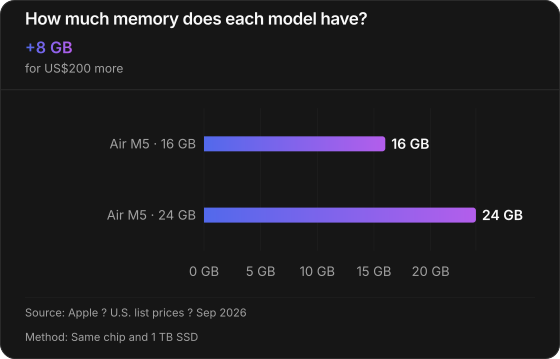
The price rose by about 12.5%, and memory capacity increased by 50%. Estimating how much time you might save would require measuring the same task on both machines. The price list tells you what the extra capacity cost.
On the 13-inch M5 MacBook Air, the memory is built in, so you choose the capacity when you buy it. An external SSD can hold more files, while the amount of physical memory stays the same.That historical premium is most useful once you know which task has to stay open, how often it slows you down, and how much memory the Mac had when it happened.
Find the right Mac for you
1 of 6 Questions
When you're working, what usually happens?
Multitasking habits
As an Amazon Associate I earn from qualifying purchases.