Which MacBook Runs the Apps You Need for Class?

What changes the choice for students?
Which MacBook fits your classes if you spend some days taking notes and others building projects? The 13-inch MacBook Air M5 is lighter and fanless.The 14-inch MacBook Pro M6 adds a more capable display, more ports, and more CPU and GPU cores. For a week of YouTube, Google Docs, and Meet, those extras may make little difference to your assignments.
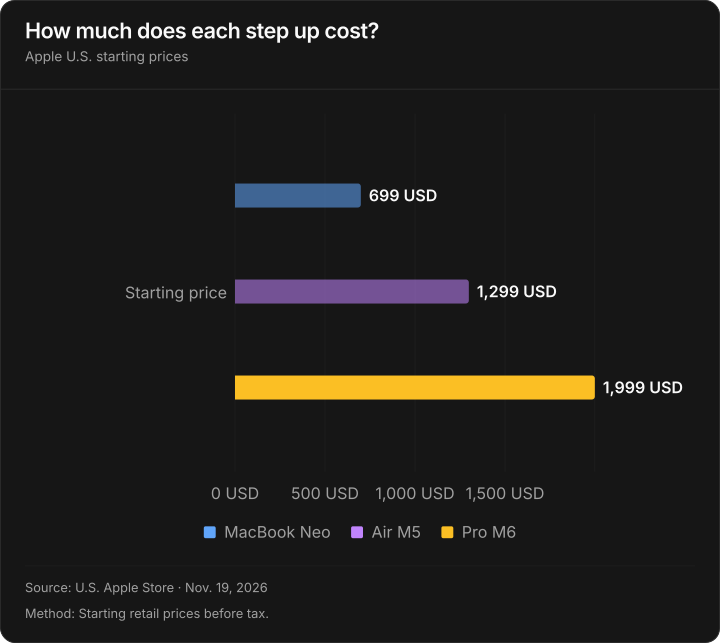
In the U.S. Apple Store on November 19, 2026, the base Air started at US$1,299 and the base M6 Pro at US$1,999.These are regular U.S. list prices before education discounts. The extra cost makes sense when those features change how you can do your work.
Think of a week that starts with video lectures and ends with coding exercises or technical drawings. Which programs do you need to open? Which projects need to stay running? How much will you store locally? Check your required software before choosing a chip.
| Feature | MacBook Air M5 | MacBook Pro M6 |
|---|---|---|
| Apple list price, Nov 19 2026 | US$1,299 | US$1,999 |
| CPU / GPU | 10-core CPU / 8-core GPU | 12-core CPU / 12-core GPU |
| Internal SSD | 512GB | 1TB |
| Display class | 13.6-inch Liquid Retina IPS | 14.2-inch Liquid Retina XDR (ProMotion) |
| Connectivity | 2 × Thunderbolt 4 | 3 × Thunderbolt 4 + HDMI + SDXC |
| Carry weight | 1.23kg | 1.55kg |
Both have 16 GB of unified memory and MagSafe 3.
Air M5 or Pro M6: What does $700 buy?
The base Air M5 has 16 GB of unified memory and a 512 GB SSD. The base M6 Pro also has 16 GB, with a 1 TB SSD.The Air has a 10-core CPU and an 8-core GPU. The Pro has a 12-core CPU and a 12-core GPU. These specifications do not tell you how long a specific project will take to compile or render.
The Pro costs US$700 more, about 53.9% above the Air. It has roughly 1.95 times the nominal SSD capacity, a Liquid Retina XDR display, HDMI, an SDXC card reader, and one extra Thunderbolt port. The price difference covers the whole configuration.
The fanless Air weighs 1.23 kg, compared with 1.55 kg for the Pro. If you carry it to class every day, that weight difference may matter more than an extra port. If you regularly transfer files from SD cards or connect a display and peripherals, the Pro can save you from carrying adapters.
Is the MacBook Neo enough for high school?
For research, documents, YouTube, and Meet in a compatible browser, the MacBook Neo is an entry-level option. Its base configuration has 8 GB of unified memory and a 256 GB SSD. It starts at US$699, US$600 less than the base Air.
The Neo makes sense when most schoolwork stays in the browser or cloud and you rarely need several demanding apps open at once. The Air M5 gives you more room for local projects and coding.The 15-inch Air makes it easier to view notes and assignments side by side. That can be useful when you refer to a textbook while writing a report.
Is the MacBook Neo enough for video classes, or will coding projects and course software push you toward an Air or Pro? Tell us what you run and how you study to see which Mac fits your coursework. Start the quiz
Apple's U.S. education pricing rules cover eligible college students and certain education staff. High school enrollment alone does not guarantee a discount. Check local taxes, availability, and support if you are buying outside the United States.

Desktop AI, beginner coding, and IDEs
Even in a course without programming, Claude for desktop can help organize notes and prepare review questions. In the desktop app that includes ChatGPT and Codex, ChatGPT Work can compare course materials or help build a spreadsheet or presentation.The online service runs the model. What matters on the Mac is how many PDFs, tabs, and apps you need open alongside it.
For beginner coding, think Python exercises, a page with HTML and JavaScript, or a first Java project. An IDE is where you write, run, and debug code.An editor such as VS Code can handle that workflow once you install the course tools. The Air M5 is a starting point if you switch between the editor, documentation, and video lectures. Check any required IDE version and extensions before buying.
Claude Code and Codex can explain an error or suggest a test for a class project. Ask for an explanation, try it in your IDE, and check the result.If your projects need several services running locally alongside the editor and browser, check the memory requirements before choosing a configuration. The Air and Pro compared here both start at 16 GB.
Engineering: Check your course software first
Open the syllabus and look for the first assignment that requires specific software. Technical drawing could mean a 2D floor plan in a DWG file.Mechanical design might require an assembly with several parts. A numerical methods class might ask you to run a MATLAB script with an add-on. Each assignment puts different demands on the Mac.
For 2D drawings and simple part modeling, the Air M5 is a starting point if your course accepts AutoCAD for Mac or Autodesk Fusion on macOS.Ask whether the class uses a specific extension or tool. Check MATLAB add-ons the same way. MathWorks lists macOS limitations, including the lack of GPU acceleration in Parallel Computing Toolbox.
Consider a Pro configuration if you expect to work on large assemblies or run simulations on the Mac itself. Ask for a sample file and check the application recommendations against it.If you need more memory, compare configurations above 16 GB. If the software recommends a Pro-class chip, check the chip name: the US$1,999 MacBook Pro in this article has the base M6.
Find the right Mac for you
1 of 6 Questions
When you're working, what usually happens?
Multitasking habits
As an Amazon Associate I earn from qualifying purchases.